

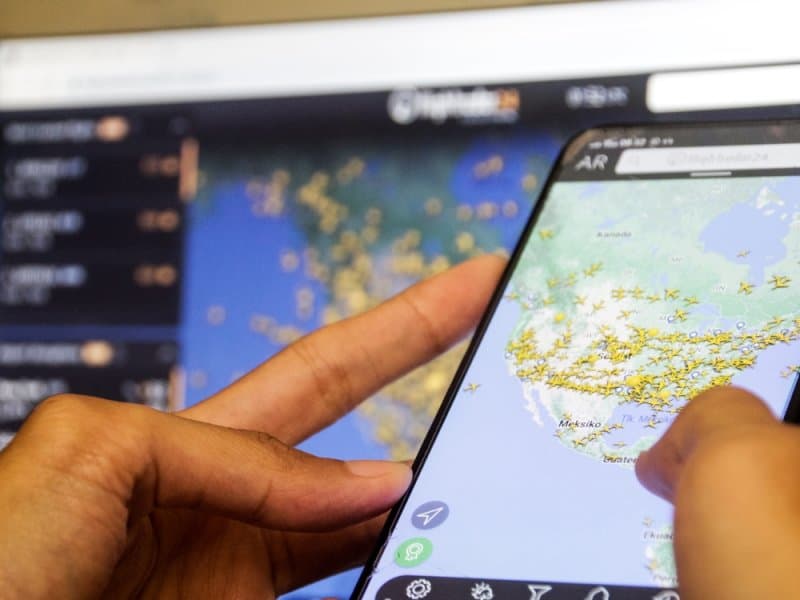
Travel gets messy fast when a flight leaves late, changes gates, circles before landing, or arrives earlier than expected. Checking an airline app helps, but sometimes you want more than a simple “on time” message. That is where real-time flight tracking becomes useful. It shows where an aircraft is, where it has been, plus when it may actually arrive.
Passengers use it. Families waiting at home use it too. Even airport pickups become less of a guessing game. In this blog, you’ll see how real-time flight tracking works, what information matters, and how to use different tracking tools without overcomplicating the trip.
Real-time flight tracking turns a flight number into something visible and useful, rather than leaving travellers to keep refreshing an airline page.
A flight tracker collects aircraft position data along with schedule, airport, route, altitude, speed, and estimated timing information. Instead of seeing only departure and arrival times, you can watch the trip develop.
This makes flight tracking useful before departure as well as while the aircraft is airborne. If a plane leaves 35 minutes late but makes up time in the air, the estimated arrival may change. That matters when somebody is driving to the airport.
A live flight tracker can show whether an aircraft is still at the gate, taxiing, climbing, cruising, descending, or approaching its destination. That extra context is often more useful than a static schedule.
Real-time flight tracking does have limits. Data can lag, coverage varies, and some aircraft may have restricted or incomplete information. So a tracker should support airline and airport information, not replace official operational updates.
These two types of information answer different questions, yet they are most useful when checked side by side.
Flight status usually covers the practical basics such as scheduled departure, estimated departure, arrival time, gate information, cancellation, or delay. For someone catching a flight, these details matter more than watching a plane icon move.
Knowing how to check live flight status and delays is simple. Search by flight number first. Then compare the airline’s latest flight status with a tracking platform, especially if timing is changing quickly.
A live flight tracking map gives the trip a visual shape. You can see the aircraft moving across states, oceans, or international borders rather than relying entirely on estimated times.
Want to know how to track a plane live on a map? Enter the airline and flight number into a service offering real-time flight tracking, open the active flight, then switch to its map view. Routes may bend or change. That is normal.
Not every platform presents aviation data the same way, so the best choice depends on what you actually want to check.
| Feature | Live Flight Tracker | Real-Time Flight Tracker | Airline Status Page |
|---|---|---|---|
| Aircraft location | Usually | Usually | Rarely |
| Live route map | Yes | Yes | Sometimes |
| Gate information | Sometimes | Often | Usually |
| Delay details | Often | Often | Usually |
| Altitude and speed | Often | Often | Rarely |
| Best for | Watching flights | Detailed monitoring | Official trip updates |
A real-time flight tracker is useful when you want route details next to timing information. Someone meeting a passenger at Los Angeles International Airport, for example, can watch the aircraft approach before leaving for the terminal.
The best real-time flight tracking websites are not necessarily the ones with the most data. A clean search, a readable live flight tracking map, useful flight status information, and reliable mobile access often matter more.
A free live flight tracker online is enough for most casual travellers. Search for the flight number, confirm the departure and destination airports, then check the current position or estimated arrival.
Some advanced flight tracking features may require subscriptions. Historical records, detailed aircraft information, alerts, or deeper aviation data are common paid extras. For simply following a family member’s flight, free access often does the job.
Some travellers want more detail than an airline page provides, particularly when following several stages of a trip.
The FlightAware flight tracker lets users search for flights and view operational information around an aircraft’s journey. Depending on the flight and available data, details can include route progress, timing, aircraft information, altitude, speed, and mapped movement.
If you are wondering how to track a flight using FlightAware, start with the flight number. Check that the origin and destination match your trip. Then open the active flight and review its map together with the latest flight status.
A live flight tracking map becomes especially handy during long flights. Suppose a New York-to-Los Angeles flight has been airborne for three hours. Instead of asking the passenger for updates, family members can follow its general progress themselves.
This is one reason real-time flight tracking reduces travel friction. Fewer messages. Less guessing. The live flight tracker gives people waiting on the ground enough context to adjust their timing.
Tracking works best when the right information is checked rather than treating every number on screen as final.
For how to track a flight in real time, use the exact flight number whenever possible. Similar routes can operate several times per day, so searching only by airport pair may show the wrong aircraft.
Check the date too. Then compare your real-time flight tracker with the airline’s flight status before making an important decision such as leaving for the airport. One tool shows movement; the other may carry newer gate or cancellation instructions.
Estimated arrival times are estimates, not promises. Weather, air traffic, runway congestion, and routing changes, plus holding patterns, can alter them even after takeoff.
For example, real-time flight tracking might show an aircraft approaching Chicago while its estimated arrival slips by 15 minutes. The plane is moving normally, yet congestion could delay landing. That is why a flight tracker should be read as a changing picture rather than a countdown clock.
The biggest everyday benefit is simple. You can time your own movement around the aircraft instead of its original schedule.
Imagine a flight was scheduled to land at 6:10 p.m., but the live flight tracker now estimates 6:48 p.m. Leaving home based on the original schedule means extra waiting, parking costs, or repeated loops around the terminal.
Real-time flight tracking gives the person collecting a traveller a better reference point. Still, landing is not the same as reaching the curb. Taxiing, baggage claim, immigration, or walking through a large terminal adds time.
The FlightAware flight tracker and similar services can show impressive detail, but more numbers do not always mean more certainty. Position data may be current while gate information comes from another system.
Treat flight tracking as one layer. Use a live flight tracking map for aircraft movement, flight status for operational changes, and then official airline communication for instructions that directly affect the passenger.
Real-time flight tracking takes much of the guesswork out of following an aircraft. A flight tracker can show where the plane is, while flight status information explains what that movement means for the traveller. A live flight tracker becomes especially useful during delays, long routes, airport pickups, or uncertain arrival times.
Tools such as a real-time flight tracker, the FlightAware flight tracker, and the live flight tracking map offer different levels of detail, so checking more data is not always necessary. Use real-time flight tracking for context, compare important changes with official airline information, then adjust your timing. Travel still changes quickly. At least you can see more of it coming.
Not always. A real-time flight tracker may show a delay and aircraft movement, but the exact operational reason may require an airline or airport update.
Sometimes, depending on available data and privacy restrictions. Certain private aircraft may be blocked, limited, or harder to identify on a live flight tracker.
Yes, but coverage and update methods can differ from land-based tracking. A live flight tracking map may therefore update differently during long ocean crossings.
It may show a route change once data reflects it, but it cannot reliably predict every diversion beforehand. Official flight status information remains important.
Platforms may use different data feeds, refresh rates, or estimation methods. Small differences are normal, so check the airline before acting on a major timing change.
This content was created by AI